As an Amazon Associate this site earns from qualifying purchases.
The specs, side by side
Built only from what each listing states. "Not stated" means the manufacturer doesn't publish it in the listing copy — not that the feature is absent.
| Product | Price | Stabilisation | Weight | Battery | Tripod / extension rod | Tracking |
|---|---|---|---|---|---|---|
| DJI Osmo Mobile 7 Gimbal Stabilizer for iPhone & Android, 3-Axis Gimbal | Check price on Amazon | 3-axis | 300 g | Not stated | Built-in tripod | ActiveTrack 7.0 via DJI Mimo |
| DJI Osmo Mobile 8 Gimbal Stabilizer for Phone, 3-Axis Stabilization | Check price on Amazon | 3-axis | Not stated | Not stated | Built-in extension rod + tripod | Native tracking, direct phone connection |
| DJI Osmo Mobile 7P Gimbal Stabilizer for iPhone & Android, Native Tracking | Check price on Amazon | 3-axis | Not stated | Not stated | Built-in extension rod + tripod | Multifunctional Module (tracking + lighting) |
| hohem iSteady X3 SE Foldable Phone Gimbal with Detachable Remote, Black | Check price on Amazon | 3-axis, iSteady 8.0 | 0.79 lbs | 11 hrs, 2 hr charge | Not stated | AI tracking + gesture control via Hohem Joy app |
| DJI Osmo Mobile 8 Standard Combo, Gimbal Stabilizer for Phone | Check price on Amazon | 3-axis | Not stated | Not stated | Built-in extension rod + tripod | Native tracking, direct phone connection |
| COMITOK L7C Pro, Gimbal stabilizer for iPhone... Foldable Phone Gimbal Vlog Recording | Check price on Amazon | 3-axis | 0.8 lbs | 2600 mAh, 80 min charge | Not stated | AI tracking 9.0, face/object, gesture control |
Quick answer: A smartphone gimbal is a 3-axis motorised handle that cancels out your hand shake, and past that basic job the differences come down to tracking, extension rods, battery life and weight. If you want a compact stabiliser that folds flat and does the fundamentals, the DJI Osmo Mobile 7 Gimbal Stabilizer for iPhone & Android, 3-Axis Gimbal is the sensible reference point at $58.99. Everything else below is a reason to spend more, spend less, or buy something with a different feature set entirely.
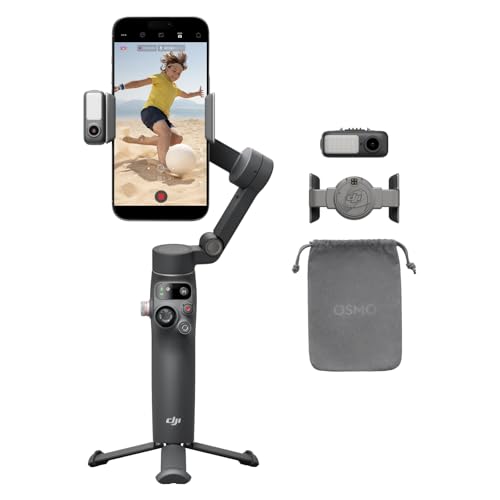
- Snap the Spectacular - The Multifunctional Module packs intelligent tracking, DJI Mic 2/DJI Mic Mini reception, and lighting features into one compact unit. Pair it with your
- Experience Seamless Stability - Osmo Mobile 7P's robust 3-axis gimbal stabilization ensures lossless stability. Capture creative bursts and craft stunning, cinema-quality
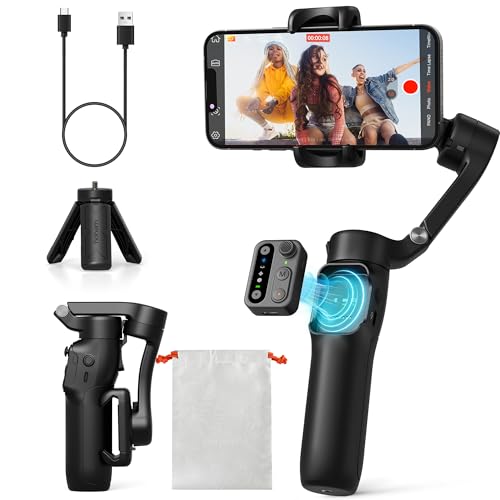
- Detachable Remote Controller: The hohem iSteady X3 SE Gimbal comes with a detachable magnetic remote, allowing you to effortlessly control selfies and videos from up to 32.81 feet
- Advanced iSteady 8.0 Technology: Featuring upgraded 3-axis stabilization, this phone gimbal ensures ultra-smooth footage, even when jogging or jumping. Perfect for action-packed
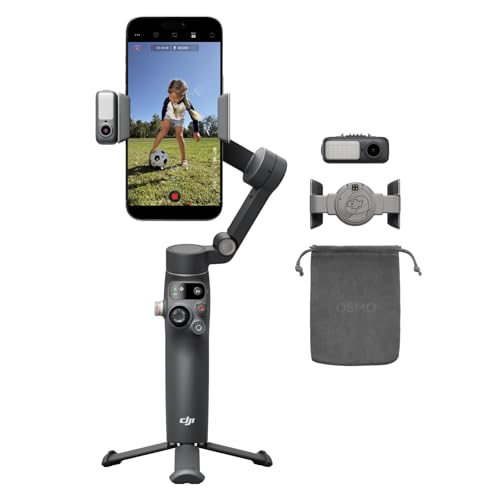
- Native Tracking With Audio [4] & Lighting [1] – Level up your shots with a DJI gimbal that combines tracking, audio reception [4], and lighting. Stay sharply in focus, well-lit
- Seamless 360° Pan Rotation – Enjoy 360° horizontal rotation for immersive shots. Intelligent tracking lets you follow subjects freely, and the built-in tripod/selfie stick adds
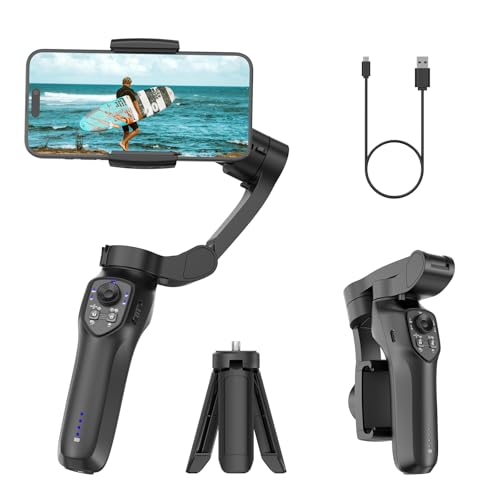
- [Upgraded 3-Axis Gimbal Stabilizer for Smartphone] Embark on a journey of capturing life's most cherished moments with the L7C Pro iPhone stabilizer, as its dynamic 3-axis
- [9.0 Intelligent AI Tracking] Discover a new realm of filming possibilities with the COMITOK L7C Pro gimble and its innovative Comitok app. Effortlessly navigate through various
The starting point most people should price against
DJI Osmo Mobile 7 Gimbal Stabilizer for iPhone & Android, 3-Axis Gimbal
At 300 grams with a foldable design and a built-in tripod, the DJI Osmo Mobile 7 Gimbal Stabilizer for iPhone & Android, 3-Axis Gimbal covers the three things a gimbal actually has to do: hold the phone level, fit in a bag, and stand up on its own when you need to be in the shot. Subject tracking comes from ActiveTrack 7.0 inside the DJI Mimo app, and the same app offers ShotGuides and One-Tap Edit if you'd rather not learn an editor. The anti-slip handle and ergonomic grip are the listing's answer to the main complaint about gimbals generally — that your forearm gives out before your battery does.
Finding the right smartphone gimbal buying guide comes down to matching the features to how you will actually use it.
What it does not advertise is an extension rod. If wide selfies and group shots are the whole reason you're buying, that omission matters more than any spec on the sheet.
Who a gimbal like this is for
- Vloggers who walk and talk. Walking footage is where phone stabilisation visibly falls apart, and a 3-axis mechanical gimbal is the only real fix.
- Travel and family filmers. The built-in tripod on the DJI models means you can set the phone down at a table, on a wall, on a car bonnet, and be in the frame.
- People who film alone. Tracking is the feature that replaces a camera operator. Every product here offers some form of it.
- Anyone whose footage looks fine on the phone screen and terrible on a TV. That gap is almost always micro-shake.
Who should skip it
- You mainly shoot stills. A gimbal does nothing for photos that your phone's own stabilisation doesn't already do.
- You shoot mostly static, tripod-mounted content — talking-head videos, product shots, streams. Buy a tripod. It's cheaper and it never needs charging.
- You already shoot with an action camera. Those have their own stabilisation built in, and a phone gimbal won't hold one.
- You won't carry it. The honest failure mode of gimbals is that they live in a drawer. If the answer to "will this be in my bag every day?" is no, the 300 g and the fold-flat design stop being selling points.
- Your phone is unusually large or heavy. Compatibility is a hard limit, not a preference — the COMITOK L7C Pro, for example, states phones under 7 inches and up to 0.62 pounds.
The honest trade-offs
Price does not map cleanly to capability here. The DJI Osmo Mobile 8 Standard Combo is listed at $92.00 while the DJI Osmo Mobile 8 sits at $149.00, and both describe the same core native tracking, audio reception, lighting and 360° pan features. The difference is what's in the box, not what the gimbal does. Read the combo contents carefully before assuming the more expensive one is more capable.
Battery figures are inconsistently published. Hohem states 11 hours on a 2-hour charge; COMITOK states a 2600 mAh cell and an 80-minute charge. None of the DJI listings here state runtime at all. If all-day filming is your use case, that silence is a real consideration.
Ecosystem lock-in is quiet but real. DJI's tracking, ShotGuides and One-Tap Edit run through DJI Mimo. Hohem's tracking, gesture control and templates run through Hohem Joy. COMITOK's run through its own app. You're buying into a piece of software as much as a piece of hardware, and app quality is the thing spec tables never capture.
Extension rods add reach and add bulk. The Osmo Mobile 8, 8 Standard Combo and 7P all state a built-in extension rod. That's genuinely useful for group shots and low angles — and it's more to fold, more to carry, and more leverage on your wrist.
What to check on the listing before you buy
Listings change; this article doesn't update itself.
- Current price. Every figure here is a snapshot. Gimbals in particular swing hard around new-model launches.
- Which variant you're in. DJI sells multiple Osmo Mobile 8 configurations. Confirm on the listing page whether the tripod, extension rod, magnetic mount, fill light module or remote are included in the exact box you're adding to cart.
- Phone compatibility. Check stated size and weight limits against your phone with its case on. Thick cases are the usual culprit.
- Warranty and seller. Confirm whether you're buying from the brand, Amazon, or a third-party marketplace seller — return terms differ.
- Reviews. Go and read the recent one- and two-star reviews yourself, filtered to the variant you're buying. That's where app problems and motor failures surface.
Other options worth a look
DJI Osmo Mobile 8 Gimbal Stabilizer for Phone, 3-Axis Stabilization — consider instead if…
…you want the fullest feature set DJI lists here and you're not shopping on price. The DJI Osmo Mobile 8 Gimbal Stabilizer for Phone, 3-Axis Stabilization combines native tracking with audio reception and lighting in one unit, adds 360° horizontal pan rotation for continuous sweeping shots, and includes a built-in extension rod and tripod. The direct phone connection means tracking starts without a separate pairing dance. At $149.00 it's the most expensive option here, so only pay it if the lighting and audio integration are things you'd genuinely use.
DJI Osmo Mobile 8 Standard Combo, Gimbal Stabilizer for Phone — consider instead if…
…you want the Osmo Mobile 8 feature set for meaningfully less. The DJI Osmo Mobile 8 Standard Combo, Gimbal Stabilizer for Phone is listed at $92.00 and describes the same native tracking with audio and lighting, the same 360° pan rotation, the same direct phone connection, and the same built-in extension rod and tripod. Check the box contents on the listing to see exactly what the "Standard" designation includes before you decide the saving is free.
DJI Osmo Mobile 7P Gimbal Stabilizer for iPhone & Android, Native Tracking — consider instead if…
…you already own or plan to buy a DJI Mic. The DJI Osmo Mobile 7P Gimbal Stabilizer for iPhone & Android, Native Tracking has a Multifunctional Module that packs intelligent tracking, DJI Mic 2 / DJI Mic Mini reception and lighting into one compact unit — that's a real workflow advantage if audio is your weak point. Setup is about as fast as it gets: unfold to power on, drop the phone onto the magnetic mount, and Mimo opens automatically. Built-in extension rod and tripod included, at $99.00.
hohem iSteady X3 SE Foldable Phone Gimbal with Detachable Remote, Black — consider instead if…
…you film yourself from a distance. The hohem iSteady X3 SE Foldable Phone Gimbal with Detachable Remote, Black ships with a detachable magnetic remote that works from up to 32.81 feet, which is the single most useful feature here for solo shooters, family group shots and anything where you need to start recording from inside the frame. It's 0.79 lbs, folds pocket-sized, runs iSteady 8.0 stabilisation, and states 11 hours of operation from a 2-hour charge — the only stated all-day battery figure in this comparison. $51.98.
COMITOK L7C Pro, Gimbal stabilizer for iPhone, Phone Stabilizer for Video Recording with Face/Object Tracking, 3-Axis Gimbal for Android & iPhone 15 Pro Max, Foldable Phone Gimbal Vlog Recording — consider instead if…
…you're testing whether you'll actually use a gimbal before committing real money. At $29.99 the COMITOK L7C Pro, Gimbal stabilizer for iPhone, Phone Stabilizer for Video Recording with Face/Object Tracking, 3-Axis Gimbal for Android & iPhone 15 Pro Max, Foldable Phone Gimbal Vlog Recording is the cheapest entry point here and still lists 3-axis stabilisation, AI face and object tracking, gesture control and no manual levelling required. It weighs 0.8 lbs, folds to 6 × 4.3 × 1.8 inches, and its 2600 mAh battery charges in 80 minutes. Mind the compatibility ceiling: phones under 7 inches and up to 0.62 pounds.
FAQ
Does a gimbal still help if my phone already has stabilisation? Phone stabilisation is electronic — it crops and warps the frame to compensate. A gimbal is mechanical, moving the phone itself on three motorised axes. They solve overlapping but different problems, and the difference shows most while walking.
Do I need the app? For basic stabilisation, no. For tracking, you generally do — DJI's ActiveTrack runs in DJI Mimo, Hohem's tracking runs in Hohem Joy, and COMITOK's runs in its own app. The Osmo Mobile 8 and 8 Standard Combo describe a direct phone connection for tracking, which is designed to simplify that step.
Is the extension rod worth paying extra for? Only if you shoot group selfies, wide travel shots or low angles. The Osmo Mobile 8, 8 Standard Combo and 7P list a built-in rod; the Osmo Mobile 7 lists a built-in tripod without mentioning one.
How much does weight actually matter? More than people expect on day one and less than they fear by week three. The stated figures here range from 300 g for the Osmo Mobile 7 to 0.8 lbs for the COMITOK L7C Pro — a real but not dramatic spread. Grip design matters roughly as much as the number.
Related guides
- Best drones, gimbals and content creator gear - camera drones, smartphone gimbals, action cameras, ring lights and stream decks with High Value Assets
- Best drones, gimbals and content creator gear - camera drones, smartphone gimbals, action cameras, ring lights and stream decks with Limited History
- Top 10 Tips for Best drones, gimbals and content creator gear - camera drones, smartphone gimbals, action cameras, ring lights and stream decks
Key Takeaways
- Choosing the right smartphone gimbal buying guide means matching the key features to your specific needs and budget
- Read real customer reviews and check the return policy before you commit
- Compare value across models — the priciest option is not always the best fit