As an Amazon Associate this site earns from qualifying purchases.
Specification comparison
Quick answer: Put the ring light directly in front of your face, slightly above eye level, tilted down about 10–15 degrees, and pull it back far enough that it fills your face without blowing out your forehead. Match its color temperature to the room you're sitting in, then drop the brightness until your skin looks lit rather than glowing. Almost every bad ring-light photo comes from the light being too close, too bright, or off to one side.
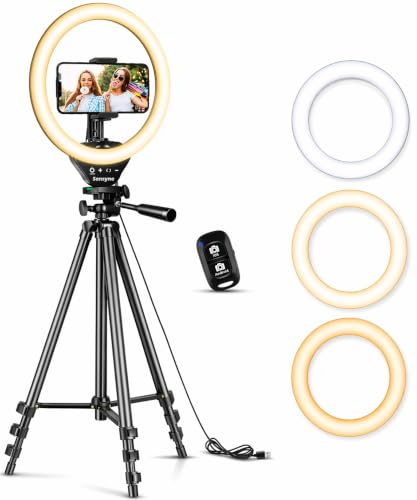
- 【Perfect Lighting for Video, Makeup & Streaming】3 color modes (warm, natural, cool) with 10 brightness levels let you easily create soft, even lighting for TikTok, Zoom calls
- 【50" Adjustable Tripod – Desk to Full Height】Extendable from 15.7" to 50", perfect for desk use, standing filming, or full-body shots. One setup for video calls, live streaming
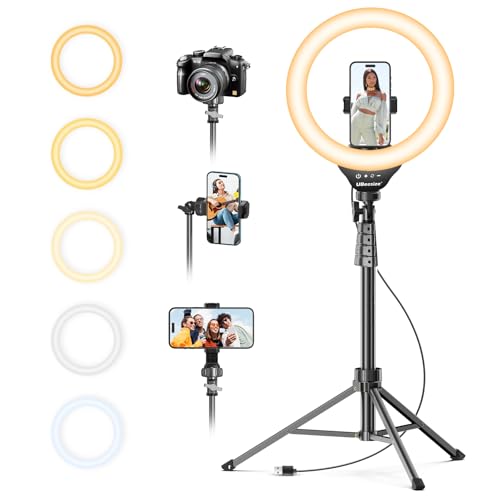
- 【12-INCH RING LIGHT WITH 240 LEDS】Equipped with 240 high-efficiency LEDs, this 10W ring light delivers bright, stable and evenly diffused illumination. The soft light helps reduce
- 【TOUCH CONTROLS, 5 COLOR MODES & 10 BRIGHTNESS LEVELS】Adjust power, color temperature and brightness directly from the responsive touch-control panel. Choose from 5 color modes
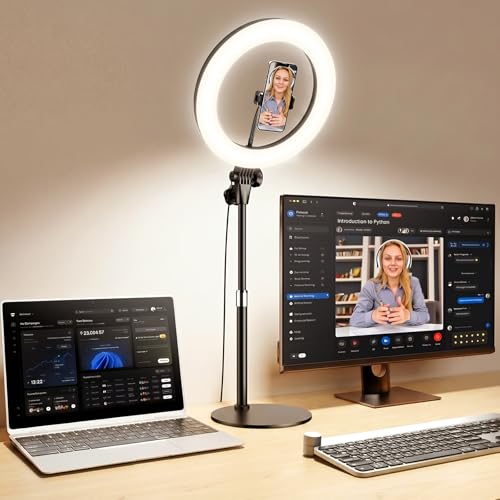
- BRIGHTER AND SOFTER: This ringlight features an large 10.5" lamp head with 120 pieces LED, and its impressively curved design sets it apart from other flat lamp shades. We've
- ADJUSTABLE LIGHTING: This halo light with stand features a dimmable function with 3 color temperatures and 10 brightness levels (3000K-6500K), allowing you to customize the
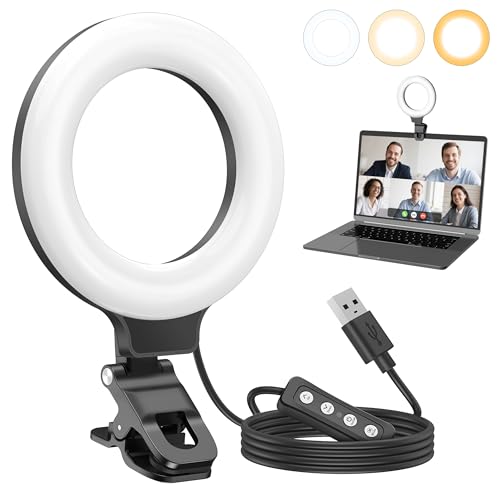
- 【Universal Clip-On Design for Laptop & Desktop Screens】 This ring light for computer can attach smoothly to screens ≤ 2.5cm (0.98in) thick, perfect for laptops and desktop
- 【360° Rotation & 170° Tilt Flexibility】 The light for video recording easily rotate 360° sideways and tilt 170° up/down to adjust the lighting angle. Webcam light perfect for
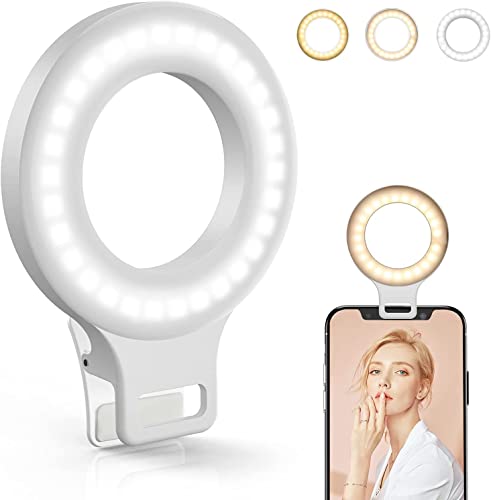
- Do you feel annoyed about the blurry photos s caused by the poor light? Kimwood portable ring light can provides a stable and soft light source, making the photo look brighter and
- 【3 Dimmable Lights Modes】Cold, Natural and Warm, which can help you easily adjust the color, and take perfect picture under different ambient lighting condition
The three things that actually matter
Position. The ring light should be centered on your face with the camera lens in or near the middle of the ring. That's the whole point of the shape — it wraps light evenly around your features instead of hitting you from one side. Off to the left, a ring light is just a mediocre side light.
Height. Slightly above eye level, angled down. Below eye level gives you the horror-movie uplight. Far above gives you dark eye sockets. A few inches above your eyes, tilted toward your face, is the sweet spot for nearly everyone.
Finding the right how to light your face with a ring light comes down to matching the features to how you will actually use it.
Distance. Most people put the light way too close. At arm's length or a bit further, the light softens across your face. At six inches, you get a hot bright center and a fall-off into shadow at your jaw and ears.
If you get those three right, a $19 clip-on will beat a $200 panel that's aimed wrong.
Step by step: using a ring light on your face
- Set the light first, then the camera. Put the ring where you'll be sitting, turn it on, and look at it. Then bring the phone or webcam into the center of it.
- Sit so the ring is centered on your nose. Not your shoulder. Not your monitor.
- Raise it just above your eyeline and tilt down. The catchlight — that ring reflection in your pupils — should sit in the upper half of your iris. If it's sitting low, your light is too low.
- Back off until the brightness evens out. Move your face away from the ring, not the ring away from you, and watch where the hot spot goes.
- Match color temperature to the room. Warm lamps and evening light? Use the warm mode. Daylight from a window? Cool. Mixing a cool ring light with a warm room lamp is what makes skin look green or magenta on camera.
- Turn the brightness DOWN. Start at maximum, then step down until your forehead and nose stop shining. On a 10-level unit like the Sensyne or UBeesize, indoor use often lands around level 3–5.
- Kill or dim the light behind you. A window behind your head will force your camera to expose for the window and underexpose you no matter how bright the ring is.
Who a ring light is for
- Anyone on video calls in a room without good, consistent window light.
- Makeup, tutorials, and talking-head video where flat, even, shadowless light is the goal.
- Phone-first creators who need the light and the phone mount in one object — that's the case for the Sensyne Ring Light with Stand, 50" Phone Tripod for iPhone & Android, LED Ring Light with Remote, 3 Color Modes & 10 Brightness Levels for TikTok, Zoom & Video Recording, which bundles ring, tripod, phone holder and a remote that works up to 30ft away.
- People who record at a desk and never want to think about it again — a clip-on that lives on the monitor is the lowest-friction option.
Who should skip it
- If you already sit facing a north-facing window during your work hours, you have better light than any of these, for free.
- If you wear glasses on every call and can't move the light high enough — a diffused off-axis panel avoids the reflection problem entirely.
- If you want moody, sculpted, cinematic lighting. Ring lights do the opposite: they flatten. That's a feature for makeup and a bug for drama.
- If you shoot full-body or product-on-table content, a ring aimed at your face is the wrong tool.
The honest trade-offs
Ring lights flatten faces. Even, shadowless light erases the shadows that give a face depth. Great for skin, less great if you want structure. Many creators end up adding a second light off to one side later.
The reflection is a giveaway. The donut catchlight in your eyes is a signature. Some people love it; some find it distracting.
Small rings are hard light. A 48- or 60-LED clip-on is a small source, so it's less forgiving than a 10.5" or 12" head. Physically bigger heads — the 12" on the UBeesize, the 10.5" curved head on the Yarrashop desk light — spread light over a wider area and soften the transitions.
Cheap LEDs can render color badly. Skin tones go sallow or plastic. Color rendering index is the spec to look for: the Anautin lists CRI 97+ and the Yarrashop desk light lists CRI over 95. The other units here don't state a CRI figure.
Tripod stands wobble. Tall, lightweight tripods with a light head and a phone on top are top-heavy by design. A weighted desk base trades reach for stability.
What to check on the listing before you buy
Listings change constantly — specs, bundles and prices all shift without the title changing.
- Current price. Every figure above is a snapshot. Check what it actually costs today.
- Which variant you're selecting. Ring lights are sold in size and bundle variants on the same page. The 12" version and the 8" version may share a listing; confirm the size and stand length in the cart, not the headline.
- What's actually in the box. The Yarrashop listing explicitly notes the 5V/2A adapter is not included. Check whether you need a USB wall plug you don't own.
- Power source. USB-powered units need a free port or a charger. Only the Kimwood lists a battery (600mAh, roughly 2.5 hours), so it's the one that works away from an outlet.
- Clip thickness limits. The Anautin specifies screens up to 0.98"; measure your monitor bezel before ordering a clip-on.
- Warranty and return window. Confirm the seller's terms on the page itself.
- Read recent buyer reviews yourself, filtered to the newest ones and to your variant. Manufacturing changes over a product's life and old reviews may describe a different unit.
Cyezcor Video Conference Lighting Kit, Ring Light for Monitor Clip On — consider instead if…
…your entire use case is Zoom and you never want a stand on your desk. The Cyezcor Video Conference Lighting Kit, Ring Light for Monitor Clip On clamps to the edge of your screen, runs off any USB port (monitor, laptop, power bank, phone charger), and rotates to aim. It's 48 LEDs at 10W with 3 color temperatures spanning 3200K–6800K and 5 brightness steps. At $19.98 it's the "set it once, forget it" option — but 5 brightness levels is coarser control than the 10-step units, and there's no phone mount.
Anautin Ring Light for Video Conference Lighting,360°Adjustable,Portable LED Video Conference Lighting for Monitor,Laptop&Desktop Computer,Streaming Light for Zoom Meetings, Selfie Makeup, Video Calls — consider instead if…
…color accuracy on skin matters more to you than size. The Anautin Ring Light for Video Conference Lighting,360°Adjustable,Portable LED Video Conference Lighting for Monitor,Laptop&Desktop Computer,Streaming Light for Zoom Meetings, Selfie Makeup, Video Calls is the cheapest here at $10.60 and the only one listing 64 high-CRI 97+ LEDs, with a 2600K–6500K range, 5 brightness levels, 360° rotation and 170° tilt. The 79" USB cable helps with desktop routing. Clip limit is 0.98" thick, so measure first.
Clip on Ring Light, Kimwood Rechargeable 60 LED Selfie Ring Light for Phone, Laptop, Tablet (3 Models, 5 Level Brightness) — consider instead if…
…you need light away from a desk. The Clip on Ring Light, Kimwood Rechargeable 60 LED Selfie Ring Light for Phone, Laptop, Tablet (3 Models, 5 Level Brightness) is the only battery unit in this group — 600mAh for about 2.5 hours, with a 3ft cable so you can run it plugged in too. The 1.38" clip fits phones, tablets, laptops and makeup mirrors, with 3 color modes and 5 brightness levels. It's small, so it's a harder light source than the big heads.
Desk Ring Light with Stand for Computer, Desk Light for Video Recording — consider instead if…
…you want a large soft source that doesn't rely on a clip or a tall tripod. The Desk Ring Light with Stand for Computer, Desk Light for Video Recording has a 10.5" curved head with 120 LEDs, CRI over 95, 3000K–6500K across 3 temperatures and 10 brightness levels. It extends 23"–31" on an anti-scratch metal base, tilts 180°, and includes a 360° bendable metal phone arm. Note the 5V/2A adapter isn't in the box.
UBeesize 12" LED Ring Light with 62" Tripod Stand, Phone Holder & Remote — consider instead if…
…you want the biggest, softest ring here and full-height flexibility. The UBeesize 12" LED Ring Light with 62" Tripod Stand, Phone Holder & Remote runs 240 LEDs at 10W across a 12" head, with touch controls, 5 color modes from 3000K to 6000K, and 10 brightness steps from 10% to 100%. The tripod extends to 62" and converts into a handheld selfie stick, and a Bluetooth remote is included. Bigger head, more reach — and more to pack away.
FAQ
How do you use a ring light for the most flattering result? Center it on your face, put it slightly above eye level tilted down, keep it about arm's length away, and turn the brightness down until your skin isn't shining. Then match its color temperature to the other lights in the room.
Should the ring light be brighter than the room? Slightly, yes — it should be the dominant source on your face. But "dominant" doesn't mean maximum. If your nose and forehead have visible hot spots, you're too bright or too close.
Warm, natural, or cool — which mode? Match the room. Warm (around 3000K) for lamp-lit evening rooms, cool (6000K+) for daylight, natural in between. Mixed color temperatures are what make skin look off on camera.
Do I need a big ring, or is a clip-on enough? For video calls and casual recording, a clip-on is genuinely enough — it's positioned correctly by default, right behind your camera. Bigger heads like the 12" UBeesize or 10.5" Yarrashop give softer, more forgiving light for close-up work like makeup tutorials.
Related guides
- Current Rates for Best drones, gimbals and content creator gear - camera drones, smartphone gimbals, action cameras, ring lights and stream decks
- Best drones, gimbals and content creator gear - camera drones, smartphone gimbals, action cameras, ring lights and stream decks Requirements Explained
- Best drones, gimbals and content creator gear - camera drones, smartphone gimbals, action cameras, ring lights and stream decks for First-Time Buyers
Key Takeaways
- Choosing the right how to light your face with a ring light means matching the key features to your specific needs and budget
- Read real customer reviews and check the return policy before you commit
- Compare value across models — the priciest option is not always the best fit